Why I Built This — And What It Has to Do With UK Business Automation
As a digital marketing agency based in West Drayton, London, we see first-hand how small businesses across the UK waste 15–20 hours per week on repetitive manual tasks — data entry, lead follow-ups, CRM updates. That is time that could be spent growing the business or serving customers.
I built an end-to-end AI automation system using n8n (open-source workflow automation), Supabase (PostgreSQL with pgvector for AI embeddings), and RAG (Retrieval-Augmented Generation). To stress-test this system under production conditions, I used my actual **Automation and Electrical Engineering CV** as the raw unstructured data baseline.
Engineering assets are notoriously complex for baseline LLMs due to specialized acronyms like PLC programming, SCADA architectures, and HMI design. By proving a RAG pipeline can flawlessly contextualize engineering documents without hallucinations, we demonstrate how this exact framework can safely handle sensitive corporate databases.
The same architecture we use in this project is the foundation for the AI and CRM automation systems we build for UK clients . This post documents the real engineering challenges — the ones most tutorials skip.
I am Muhammad Imran, founder of Exora Leads . I hold certifications from Google Analytics and SEMrush Academy. Everything in this post is from a real build, not a demo.
What Is n8n — And Why UK Businesses Are Choosing It Over Zapier
n8n is an open-source workflow automation platform that lets you connect apps, APIs, and AI models using a visual node-based editor. Unlike Zapier or Make, n8n gives you full control over your data and infrastructure — you can self-host it on your own server, which is critical for UK businesses that need to comply with GDPR and data protection regulations.
- AI Agent nodes: Native support for LLM integrations (OpenAI, Gemini, Claude) with tool calling and reasoning capabilities.
- Self-hosted option: Keep sensitive business data on UK-based servers. No third-party data sharing.
- Visual workflow builder: Drag-and-drop nodes for HTTP requests, databases, email, and more.
- Cost-effective: The free tier is generous. Self-hosted plans start at €20 per month versus Zapier's £50+ per month for similar capabilities.
How the AI Job Apply Automation Works — Step by Step
Step 1: CV Retrieval from Google Drive
The workflow starts by fetching the user's CV from Google Drive. n8n connects to the Google Drive API, searches for the latest CV document, and retrieves it as binary data. Before the AI can process it, we convert the binary file to plain text using a transformation node.
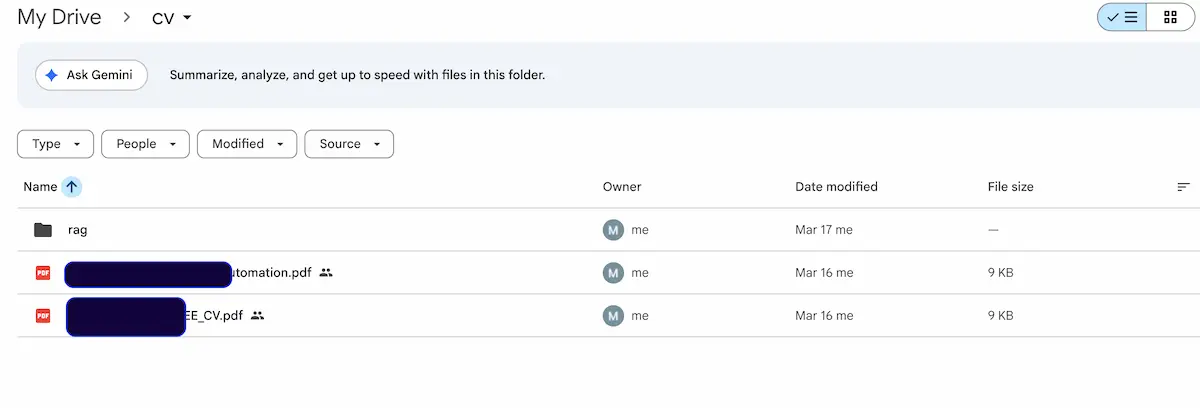
*Figure 1.1: Production file infrastructure within Google Drive housing the unstructured source CV documents ready for native binary-to-text extraction.*
Step 2: Embedding Generation with Gemini
The CV text is sent to Google's Gemini text-embedding-004 model, which generates a 768-dimensional vector representation. This vector is stored in Supabase using the pgvector extension — enabling fast cosine similarity searches.
Step 3: RAG — Retrieval-Augmented Generation
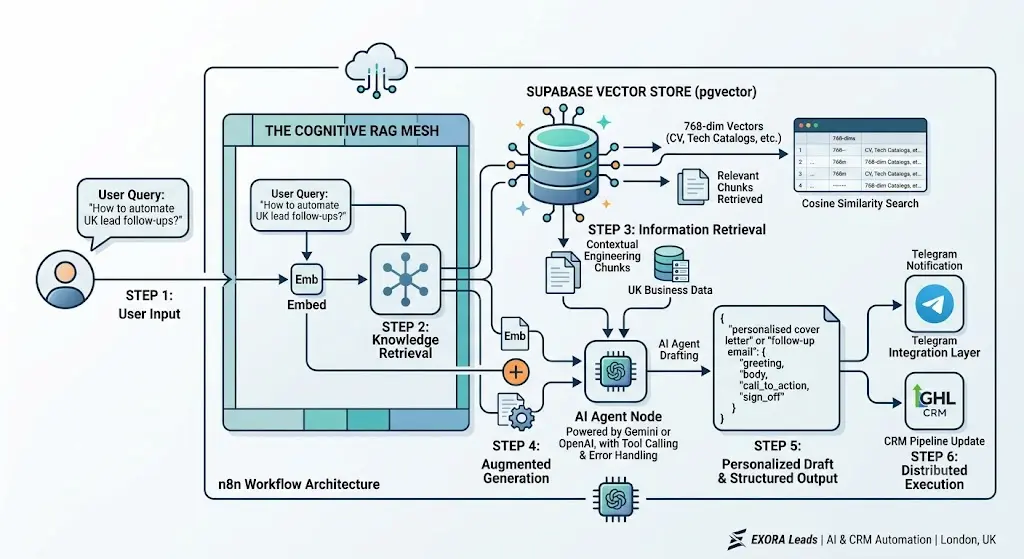
*Figure 1.2: End-to-end Cognitive RAG Mesh mapping semantic search matching via 768-dimension Supabase vector store matrices to structured JSON model outputs..*
When a new job posting is found, the job description is also embedded. The system queries Supabase to find the most relevant CV sections using cosine similarity. These chunks are injected into the AI Agent's prompt as context — so the model writes a tailored cover letter based on actual experience, not hallucinated content.
Step 4: AI Agent Drafting
The AI Agent node (powered by Gemini or OpenAI) receives the job description plus retrieved CV context and drafts a personalised cover letter. To ensure consistent output, I configured a structured output tool that forces the model to return a defined JSON schema with required keys: greeting, body, call_to_action, and sign_off.
Step 5: Telegram Notification and Google Drive Storage
Once the cover letter is drafted, the system sends it via Telegram and saves a copy to Google Drive. If the structured output check fails, the workflow routes to a fallback path using a smaller model with a tighter prompt — preventing crashes and keeping the pipeline running.
Visualizing the Production Architecture: Our 3-Zone Topology
As shown in our live production blueprint below, we don't build linear automation loops. We break our enterprise pipelines into three completely isolated functional zones to preserve data integrity and prevent hard execution breaks:
- The Ingestion Layer: Captures unstructured payloads, executing clean transformations before data hits our model nodes.
- The Cognitive RAG Mesh: Coordinates semantic retrieval using our specialized 768-dimension Supabase vector store configurations, enforcing strict JSON output validation.
- The Distributed Execution Engine: Fires parallel API requests to instantly update connected customer pipelines and trigger live communication logs.
Let's automate your workflows and build intelligent systems for your business.
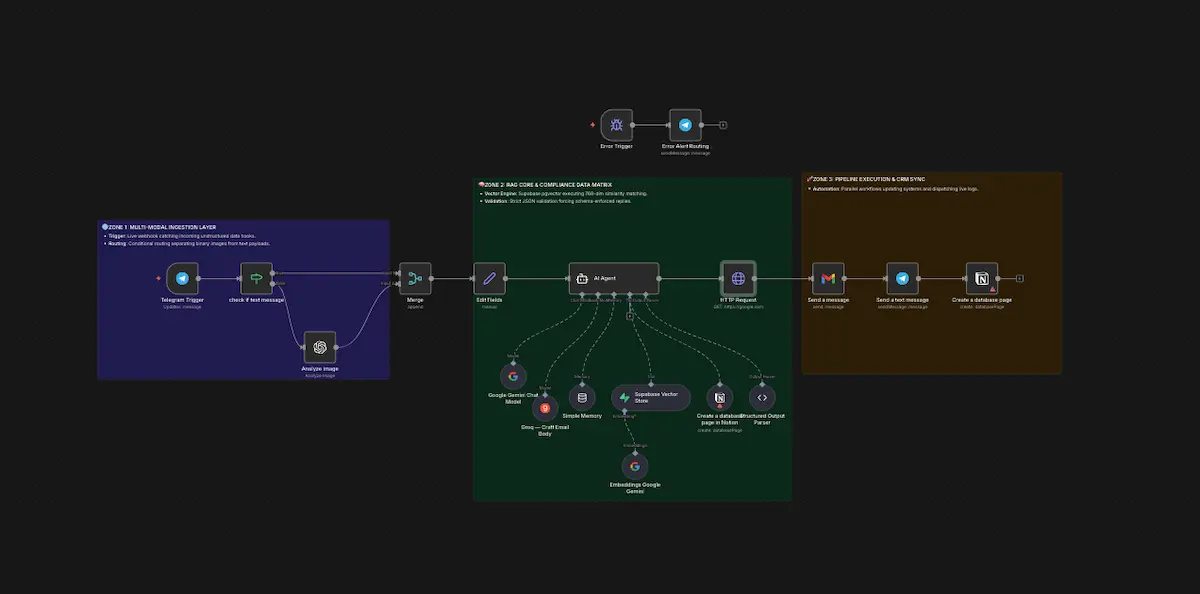
*Figure 1.3: Complete open-source n8n workflow architecture featuring Google Gemini and a native Supabase pgvector infrastructure.*
The Biggest Challenge I Faced — And How I Fixed It
Here is the issue that cost me three hours of debugging: my Supabase vector store returned zero results even though the workflow reported success.
The root cause was a vector dimension mismatch. My embedding model (Gemini text-embedding-004) outputs 768-dimension vectors, but my Supabase table's VECTOR column was defined as VECTOR(1536) — the OpenAI default. PostgreSQL silently rejected the inserts with no error. The workflow \"succeeded\" because n8n does not validate database write results by default.
The fix — drop and recreate the table with the correct schema:
CREATE TABLE cv_embeddings (
  id BIGSERIAL PRIMARY KEY,
  content TEXT,
  embedding VECTOR(768),
  metadata JSONB,
  created_at TIMESTAMPTZ DEFAULT NOW()
);

-- Cosine similarity query
SELECT content, metadata,
  1 - (embedding <=> '[query_embedding_here]') AS similarity
FROM cv_embeddings
ORDER BY similarity DESC
LIMIT 5;
If you are building n8n automation with Supabase RAG, always verify your vector dimensions match your embedding model before anything else. This one mistake cost half a day.
How This Architecture Powers Our Client Automation Builds
After building this system, the same RAG architecture became the foundation for several client automation and growth pipelines at Exora Leads. Instead of processing engineering CV assets, we hook the exact same vector framework up to internal enterprise data like technical catalogs, corporate B2B matrices, and lead databases:
- Local SEO & Map Pack Systems: We use our Local SEO Agency West Midlands frameworks to capture high-intent buyer clicks across Edgbaston and Birmingham, routing incoming traffic directly into context-rich landing experiences.
- Automated Lead Qualification: We deploy specialized workflows via our AI & CRM Automation Agency Birmingham to intercept inbound web leads, instantly running context checks to qualify and follow up with prospects via SMS or WhatsApp in under 60 seconds.
- Enterprise Pipeline Growth: We sync these vector meshes with our B2B Lead Generation Birmingham engines, dynamically mapping new client requests directly to your business's available field engineering capacities.
If you want to see how this translates into a business result, read our lead generation guide or explore our AI and CRM automation service.
Deploying Automation Under UK GDPR & Data Governance Standards
When handling professional profiles, customer databases, or proprietary engineering documentation, data privacy cannot be an afterthought. Under the UK GDPR and Data Protection Act (DPA 2018), passing unencrypted business intelligence through third-party cloud aggregators introduces severe liability.
This is exactly why we champion self-hosted n8n configurations paired with secure Supabase environments on isolated UK infrastructure. By containerizing your database stack, your proprietary intellectual property and client interactions remain strictly enclosed within your business perimeter—completely protected from being ingested into open-web AI public training sets.
n8n Automation Pricing for UK Businesses [2026]
| Service | Typical Cost | Delivery Time |
|---|---|---|
| Simple workflow (1–3 nodes) | £299–£499 | 3–5 days |
| Medium workflow (4–8 nodes, AI integration) | £599–£999 | 1–2 weeks |
| Complex workflow (RAG, multi-step, error handling) | £1,200–£2,500 | 2–4 weeks |
| Ongoing maintenance and monitoring | £99–£199 per month | Monthly |
Results After 30 Days of Running the Automation
| Metric | Before Automation | After Automation |
|---|---|---|
| Time spent per application | 25 minutes | 2 minutes (review only) |
| Applications per week | 12–15 | 40–50 |
| Follow-up consistency | Inconsistent | 100% automated |
| Hours saved per week | — | ~18 hours |
Conclusion — Ready to Automate Your UK Business?
Building AI-powered operational automation with n8n and Supabase is no longer just an interesting technical exercise — it is a foundational business necessity for UK companies that want to scale revenue without exponentially growing their headcount.
The exact context-aware RAG architecture that powers this multi-modal document pipeline is the very same baseline engine behind the automated growth funnels we design every day for B2B enterprises across West Drayton, West London, and the wider UK market.
If you want to eliminate your team's manual administrative bottlenecks, let’s audit your current setup. Book a discovery call today, and we will map out your operational workflows to show you precisely what can be automated—and exactly how many hours you will reclaim each week.
Leave a comment